Android · LESSON 27
Read linked commentary on Android
Follow this procedure inside Exegis, pause after each action, and verify the result before moving forward.
What you will accomplish
Study one commentary section and verify at least three of its references.
Use Exegis 1.15.26 or later, keep this lesson open beside the application, and preserve personal data before making installation or storage changes.
GUIDED VISUAL
Screen walkthrough
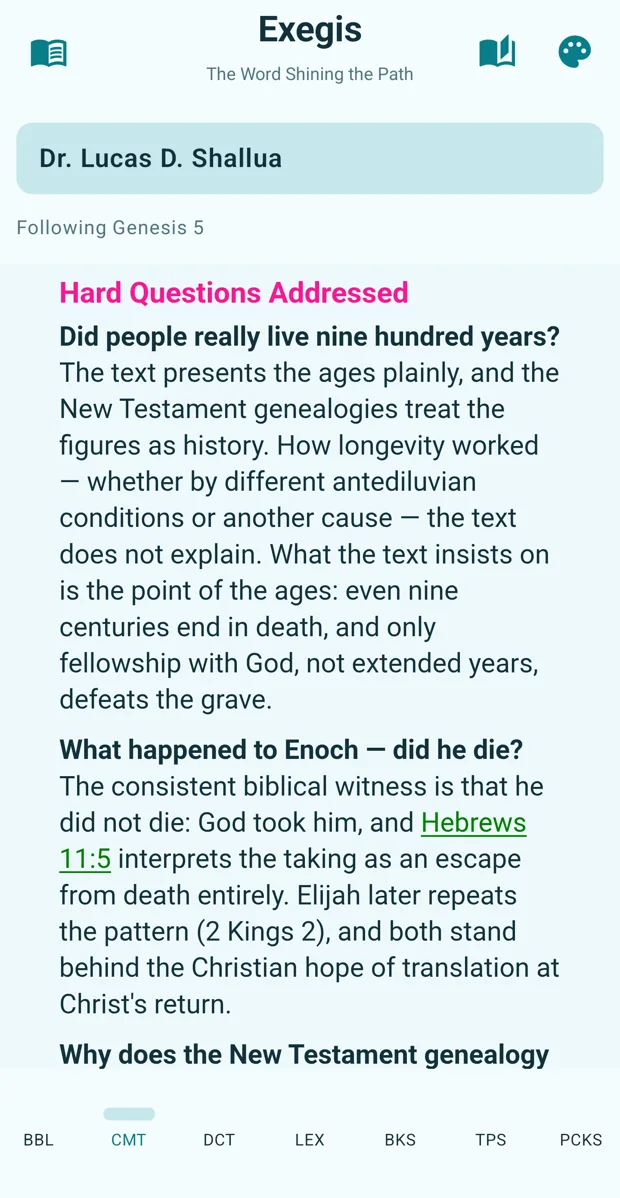
The lesson is recording-ready. The guided walkthrough uses the authentic screenshot and the exact narration sequence below; a recorded WebM/MP4 can be inserted here without changing the page.
FOLLOW IN ORDER
Detailed procedure
- 1
Navigate the Bible to the passage before opening commentary
Navigate the Bible to the passage before opening commentary.
- 2
Select Dr
Select Dr. Lucas D. Shallua Commentary and confirm that it follows the active chapter.
- 3
Read Scripture first, then the exposition, context, hard question, apologetic note, and references
Read Scripture first, then the exposition, context, hard question, apologetic note, and references.
- 4
Tap significant Scripture links and read them in context
Tap significant Scripture links and read them in context.
- 5
Return to the original passage and summarize the interpretation in your own words
Return to the original passage and summarize the interpretation in your own words.
YOUR TURN
Practice assignment
Study one commentary section and verify at least three of its references.
If the screen looks different
- Confirm that your installed Exegis version is 1.15.26 or later.
- Look for the same control inside the navigation menu when using a narrow window or phone.
- Confirm the active Bible, resource, passage, and theme before assuming content is missing.
- Restart Exegis after an installation or resource change, then repeat the last verified step.
- Use the official Contact page and include version, device, steps, expected result, and actual result.