Android · LESSON 26
Use KJV+ Strong’s on Android
Follow this procedure inside Exegis, pause after each action, and verify the result before moving forward.
What you will accomplish
Open a Strong’s number and explain its meaning in the selected verse, not merely its dictionary range.
Use Exegis 1.15.26 or later, keep this lesson open beside the application, and preserve personal data before making installation or storage changes.
GUIDED VISUAL
Screen walkthrough
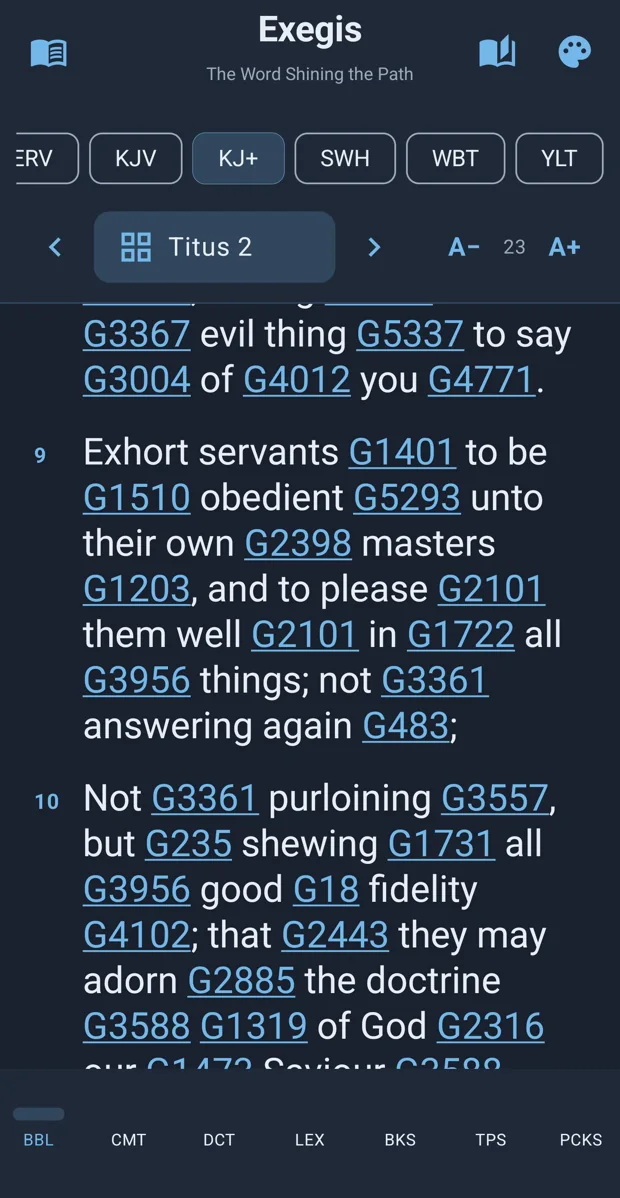
The lesson is recording-ready. The guided walkthrough uses the authentic screenshot and the exact narration sequence below; a recorded WebM/MP4 can be inserted here without changing the page.
FOLLOW IN ORDER
Detailed procedure
- 1
Select the KJV+ Bible and locate the linked Strong’s numbers
Select the KJV+ Bible and locate the linked Strong’s numbers.
- 2
Tap a number to open the corresponding Greek or Hebrew entry
Tap a number to open the corresponding Greek or Hebrew entry.
- 3
Read the entry, then return to the verse to determine the contextual sense
Read the entry, then return to the verse to determine the contextual sense.
- 4
Compare several occurrences while keeping author and genre in view
Compare several occurrences while keeping author and genre in view.
- 5
Record a restrained conclusion and avoid combining every listed gloss
Record a restrained conclusion and avoid combining every listed gloss.
YOUR TURN
Practice assignment
Open a Strong’s number and explain its meaning in the selected verse, not merely its dictionary range.
If the screen looks different
- Confirm that your installed Exegis version is 1.15.26 or later.
- Look for the same control inside the navigation menu when using a narrow window or phone.
- Confirm the active Bible, resource, passage, and theme before assuming content is missing.
- Restart Exegis after an installation or resource change, then repeat the last verified step.
- Use the official Contact page and include version, device, steps, expected result, and actual result.