Android · LESSON 29
Install content packs for offline study
Follow this procedure inside Exegis, pause after each action, and verify the result before moving forward.
What you will accomplish
Install one content pack, test it offline, and confirm where it appears in Exegis.
Use Exegis 1.15.26 or later, keep this lesson open beside the application, and preserve personal data before making installation or storage changes.
GUIDED VISUAL
Screen walkthrough
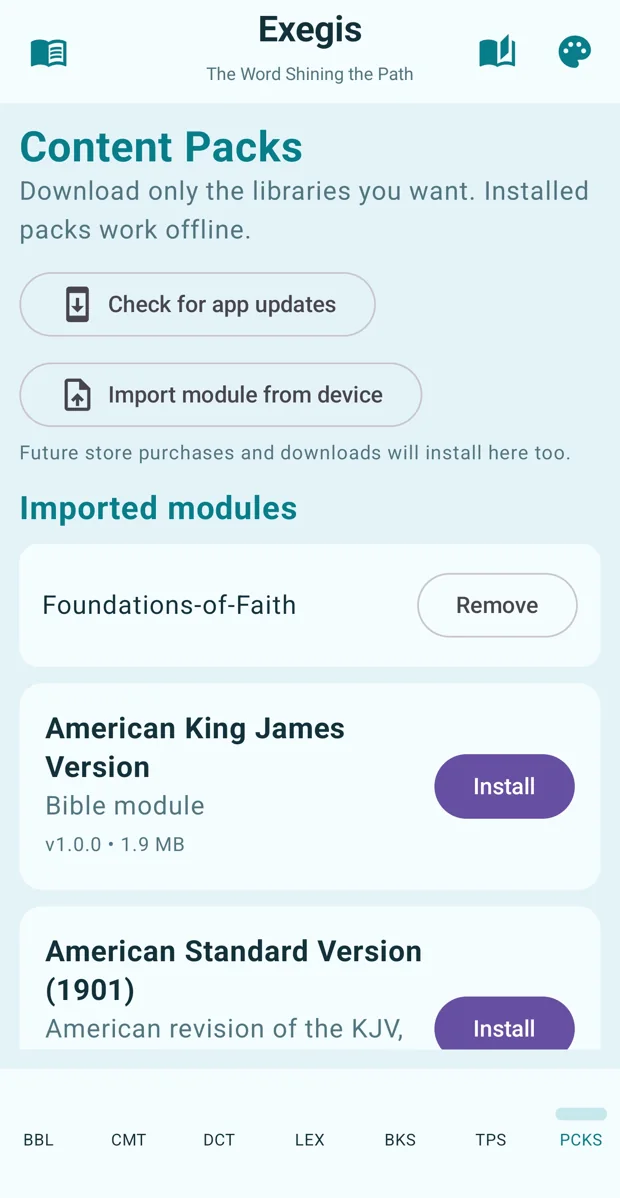
The lesson is recording-ready. The guided walkthrough uses the authentic screenshot and the exact narration sequence below; a recorded WebM/MP4 can be inserted here without changing the page.
FOLLOW IN ORDER
Detailed procedure
- 1
Open Content Packs while connected to reliable internet
Open Content Packs while connected to reliable internet.
- 2
Review each pack’s type, description, language, and approximate storage requirement
Review each pack’s type, description, language, and approximate storage requirement.
- 3
Install one pack and keep Exegis open until completion
Install one pack and keep Exegis open until completion.
- 4
Switch the device temporarily to airplane mode and confirm that the installed resource opens offline
Switch the device temporarily to airplane mode and confirm that the installed resource opens offline.
- 5
Remove optional packs from the manager when storage is needed; do not delete application files manually
Remove optional packs from the manager when storage is needed; do not delete application files manually.
YOUR TURN
Practice assignment
Install one content pack, test it offline, and confirm where it appears in Exegis.
If the screen looks different
- Confirm that your installed Exegis version is 1.15.26 or later.
- Look for the same control inside the navigation menu when using a narrow window or phone.
- Confirm the active Bible, resource, passage, and theme before assuming content is missing.
- Restart Exegis after an installation or resource change, then repeat the last verified step.
- Use the official Contact page and include version, device, steps, expected result, and actual result.